Risk Management
Purpose
The Risk Management module helps the cooperative identify, assess, monitor, and respond to risks that could affect its operations, finances, or reputation. This includes maintaining a risk register, tracking key risk indicators (KRIs), recording risk incidents, and setting the organisation's risk appetite.
Who Can Access
- Administrator
- Risk Officer / Compliance Officer
- Manager (view and review)
- Auditor (view only)
How to Open This Page
Compliance & Risk → Risk Management
Screen Overview
The main page shows a risk register — a table of all identified risks with their likelihood, impact, risk score, and owner.
Risk Register
The Risk Register is the central inventory of all risks the cooperative faces.
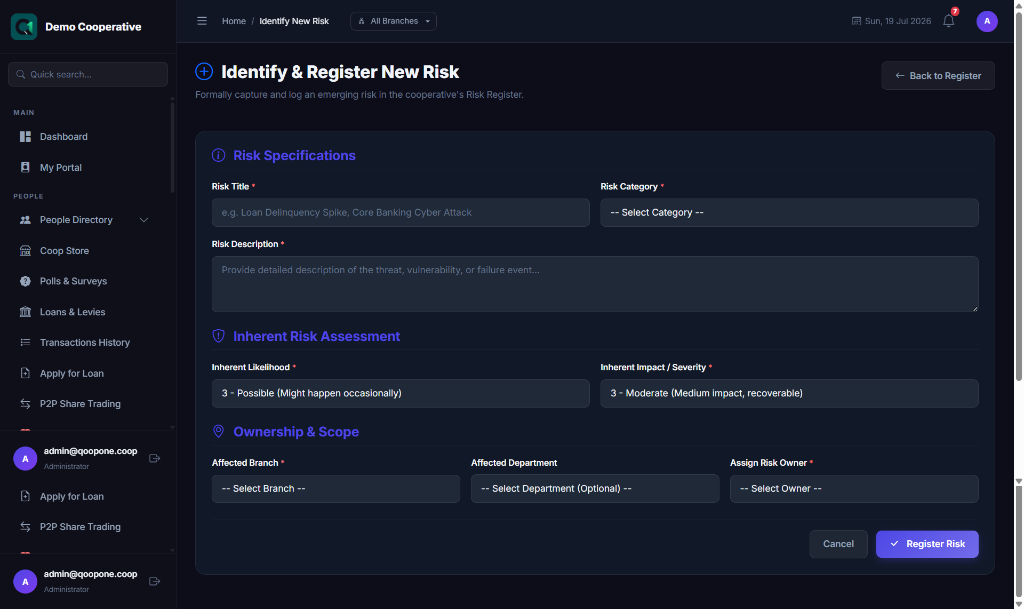
Adding a Risk
- Go to Risk → Risk Register.
- Click Add Risk.
- Enter:
- Risk Name (e.g., "Member Default on Large Loans")
- Category (Operational, Financial, Compliance, Reputational)
- Description
- Likelihood (1–5: Very Unlikely to Very Likely)
- Impact (1–5: Negligible to Catastrophic)
- Risk Owner (staff responsible for managing this risk)
- Controls in Place (existing mitigation measures)
- Click Save Risk.
The Risk Score is automatically calculated: Likelihood × Impact.
Risk Heat Map
A visual heat map shows all risks plotted by likelihood vs. impact. High-scoring risks (top-right) are priorities for immediate action.
Key Risk Indicators (KRIs)
KRIs are metrics used to monitor risk levels over time.
Examples: - Loan Portfolio at Risk (PAR) > 5% triggers a warning - Overdue levies > 20% of members triggers a warning
- Go to Risk → KRIs.
- Add KRI metrics and their threshold values.
- The system monitors and alerts when thresholds are breached.
Risk Incidents
When a risk event occurs (e.g., a fraud incident, system outage, or natural disaster):
- Go to Risk → Incidents.
- Click Report Incident.
- Enter the incident details, impact, and immediate response taken.
- Assign a follow-up action.
Risk Appetite
The Risk Appetite statement defines how much risk the cooperative is willing to accept. Administrators can document this in the Risk → Appetite section.
Tips
Tip
Review the risk register quarterly. Risks change over time — new risks emerge and old ones are resolved.
Tip
Loan default risk is often the most significant financial risk for cooperatives. Monitor the Loan Portfolio at Risk (PAR) metric weekly.