Chart of Accounts & Accounting
Purpose
The Accounting module manages the cooperative's general ledger, including the chart of accounts, journal entries, and financial statements. It automatically records all financial transactions in the system (savings deposits, loan disbursements, levy collections, etc.) and provides the foundation for financial reporting.
Who Can Access
- Administrator
- Accountant
- Auditor (view only)
- Manager (view only)
How to Open This Page
Finance → Accounting
Screen Overview
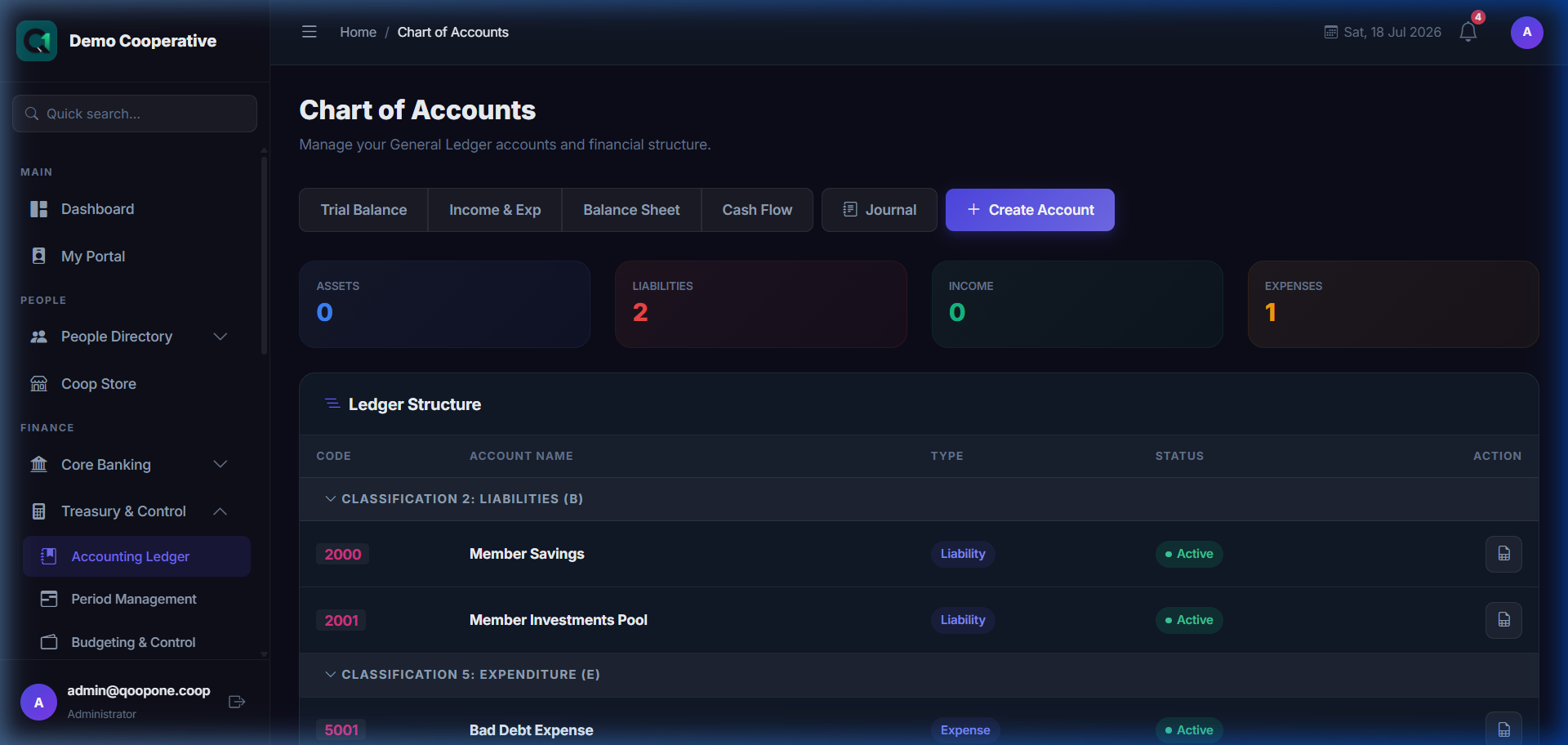
👉 HOW TO POST GENERAL LEDGER ENTRIES (Vivid Guide)
- Go to Treasury & Control -> Chart of Accounts in the sidebar.
- View ledger details: Click on any account name to view its detailed ledger report.
- Post a new entry: Click "Post Transaction" or "Journal Entry" at the top, select debit/credit accounts, enter the amount and description, and click save.
The Accounting module shows a summary of all ledger accounts grouped by type: Assets, Liabilities, Income, and Expenses.
Chart of Accounts
The chart of accounts is the complete list of all ledger accounts used by the cooperative. QoopOne auto-creates standard accounts for you, which are linked to every transaction in the system.
Standard Account Types
| Type | Examples |
|---|---|
| Asset | Cash, Member Loans, Fixed Assets, Bank Accounts |
| Liability | Member Savings, Share Capital, Deposits |
| Income | Interest Income, Loan Interest, Levy Revenue, Penalty Income |
| Expense | Salaries, Office Rent, Administrative Costs |
| Equity | Retained Earnings, Statutory Reserve |
Creating a New Ledger Account
- Go to Finance → Accounting → Chart of Accounts.
- Click Add Account.
- Enter the Account Name.
- Select the Account Type (Asset, Liability, Income, Expense, Equity).
- Enter the Account Code (optional, for internal reference).
- Click Save.
Journal Entries
Journal entries are used to record transactions that are not captured automatically — for example, adjustments, corrections, or opening balances.
Creating a Journal Entry
- Go to Finance → Accounting → Journal Entries.
- Click New Journal.
- Enter the Journal Date.
- Enter a Description (e.g., "Opening balance adjustment").
- Add Debit and Credit lines:
- Select the Account
- Enter the Amount
- Verify that Total Debits = Total Credits (the journal must balance).
- Click Post Journal.
Warning
Only post journal entries if you understand double-entry bookkeeping. A wrong journal entry can distort your financial statements. When in doubt, consult your accountant.
Cashbook
The Cashbook shows all cash-based transactions posted through the system.
Finance → Accounting → Cashbook
Use the date filters to see all cash inflows and outflows within a period.
Accounting Periods
QoopOne uses accounting periods to organise financial data by month and year. At the end of each period, the period can be "closed" to prevent back-dated entries.
- Go to Finance → Accounting → Periods.
- View the current open period.
- When the month is complete, click Close Period.
Financial Statements
QoopOne generates three key financial statements automatically from your ledger data:
| Statement | Purpose |
|---|---|
| Income Statement (P&L) | Shows income, expenses, and net surplus for a period |
| Balance Sheet | Shows assets, liabilities, and equity at a point in time |
| Cash Flow Statement | Shows cash inflows and outflows during a period |
| Trial Balance | Lists all accounts and their debit/credit balances |
See Financial Statements for step-by-step report generation.
Ledger View
To see all transactions posted to a specific account:
- Go to Finance → Accounting → Ledger.
- Select the Account from the dropdown.
- Set a Date Range.
- Click View Ledger.
The ledger shows every debit and credit posted to that account, along with the running balance.
Tips
Tip
Reconcile your bank accounts monthly by comparing the Cash/Bank ledger account in QoopOne with your actual bank statement.
Note
QoopOne automatically records double-entry bookkeeping for all transactions. You do not need to post journals for savings deposits, loan disbursements, or levy collections — these are handled automatically.
Common Mistakes
- Posting duplicate journal entries — always check the journal log before posting.
- Closing an accounting period before all transactions for that period have been recorded.